Local vs Cloud AI Coding Assistants: Which Approach Wins?
The Question Is Where Your Code Goes, Not Which Is Smarter
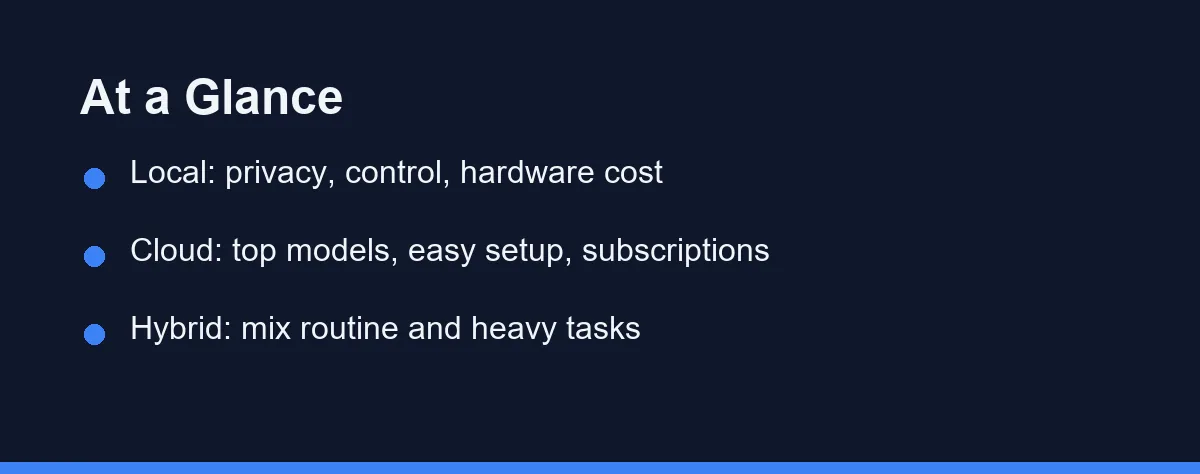
For most developers the answer is cloud, at roughly $10 to $20 per month per person. It buys top models and minimal setup. Go local only if privacy, offline work, or compliance rules outweigh that convenience, or run a hybrid that keeps routine autocomplete on your own machine.
Local assistants keep the model and your code on hardware you control. Cloud assistants send your requests out to a service that returns suggestions. Both can autocomplete code and answer questions, but they make very different promises.
This guide compares the two approaches on the factors that matter, names a few real tools on each side, and closes with plain verdicts. Nothing here rests on hands-on testing, only a careful read of the landscape as of the time of writing.
Privacy Decides It More Often Than Quality Does
Go local if privacy, control, or offline work outweighs convenience, and you have hardware that can run a capable model.
Go cloud if you want the strongest models, the least setup, and are comfortable sending code to a trusted provider.
Many teams end up mixing both, using local for routine help and cloud for the heavy lifting.
The Four Things That Separate the Two Setups
Four factors separate these two approaches. Each one can decide the matter depending on your constraints.
The first is privacy and data handling. Local tools keep code on machines you own, which suits regulated or sensitive work. Cloud tools rely on a provider’s policies, so you read those terms carefully. Neither is automatically safe, but the control differs sharply.
The second is capability. Cloud providers can run very large models on strong hardware, which often yields better reasoning and richer suggestions. Local models have improved fast, yet the top tier still tends to sit in the cloud. Check the current state before assuming a fixed gap.
The third is setup and maintenance. Cloud tools install like any extension and just work. Local tools ask more of you: hardware, model files, and occasional tuning. If you would rather not manage infrastructure, that weighs toward the cloud.
The fourth is cost shape. Cloud tools usually charge a monthly subscription. Local tools trade that for upfront hardware and your own time. The cheaper path depends on scale and how long you plan to run the setup.
The Case for Local Assistants
Local assistants run a model on hardware you control, whether a laptop, a workstation, or a private server. Your code does not leave that boundary during suggestions.
The main draw is privacy and control. For teams under strict compliance rules, or anyone wary of sending proprietary code outward, that boundary is the whole point. Offline capability is a bonus when connectivity is unreliable.
Tools in this space include options built on open models, plus assistants like Tabnine that offer self-hosted or private deployment modes for organizations. Some developers pair a local model with editor plugins to get autocomplete without a cloud round trip.
The trade-offs are real. You provide the hardware, manage updates, and may accept somewhat weaker output than the largest cloud models. For privacy-first teams, that price is often worth paying. Our roundup of the best free AI coding tools covers several no-cost starting points worth a look.
The Case for Cloud Assistants
Cloud assistants send your requests to a provider that runs the model remotely. This is how most mainstream tools work today, including GitHub Copilot, Cursor, Amazon Q Developer, and Claude Code.
The main draw is capability with minimal setup. You install an extension or app, sign in, and start coding. Behind the scenes, powerful servers handle the heavy computation, which often means stronger suggestions.
Cloud tools also update quietly. New models and features arrive without you managing files or hardware. For fast-moving teams, that low overhead is a genuine advantage.
The published entry prices sit close together (as of Aug 2026). GitHub Copilot Pro lists at $10 per user per month, Cursor Pro at $20/month, and Claude Pro at $20/month, or $17/month billed annually, and each of the three also offers a free tier.
The trade-off is that your code travels to the provider, so trust and policy matter. Sensitive projects need a close read of data handling before adoption. For most everyday coding, though, the convenience and quality make cloud the default choice.
Cloud tools also scale cleanly across a group. A team can standardize on one assistant, share settings, and roll out access per seat without touching hardware. That makes coordination simpler than maintaining local models on many machines. For a wider view of shared setups, see our guide to AI coding assistants for teams.
What Changes as Models Improve
This comparison sits on shifting ground, so it helps to think about direction, not just today’s snapshot. The gap between the two approaches keeps moving.
Local models have improved sharply, with smaller models now handling tasks that once needed a large cloud system. As that trend continues, more capable local setups become practical on ordinary hardware. The privacy-first path grows stronger over time.
Cloud models keep advancing too, and providers push the frontier of capability. So even as local catches up on common tasks, the cloud often holds the lead at the top end. Both sides move, which is why a fixed verdict ages badly.
The takeaway is to revisit your choice periodically. A decision that made sense a year ago may deserve a fresh look as hardware, models, and policies change. Treat the local-versus-cloud call as a setting you can tune, not a switch you flip once.
Local and Cloud, Line by Line
The table below summarizes how the two approaches differ.
| Factor | Local assistants | Cloud assistants |
|---|---|---|
| Where code goes | Stays on your hardware | Sent to a provider |
| Privacy control | High, in your hands | Depends on provider policy |
| Model capability | Improving, often smaller | Often top-tier |
| Setup effort | Higher, needs hardware | Low, install and sign in |
| Maintenance | You manage it | Provider handles it |
| Offline use | Possible | Usually not |
| Cost shape | Upfront hardware and time | Ongoing subscription |
| Best fit | Privacy-first teams | Convenience-first developers |
Hardware Up Front Versus a Bill Every Month
Costs vary widely by setup and vendor, so treat these as approximate and confirm current pricing on the official site for any tool you consider. The shapes below reflect the market as of the time of writing.
| Path | Local assistants | Cloud assistants |
|---|---|---|
| Entry cost | Free software, your hardware | Free tiers on many tools |
| Individual paid | Optional private plans | Roughly $10 to $20 per month (Copilot Pro $10, Cursor Pro $20, as of Aug 2026) |
| Team or business | Self-hosted or enterprise deals | Per-seat subscriptions |
Local paths can start free if you already own capable hardware, though your time is a real cost. Cloud paths spread expenses into predictable monthly fees, with free tiers to start. Because pricing models differ so much, compare total cost over the period you expect to use the tool, not just the sticker figure.
The Hybrid Middle Ground
Framing this as a strict either-or misses how many teams actually work. A hybrid setup borrows from both sides, and it is becoming a common answer.
The idea is to route tasks by sensitivity and difficulty. Routine autocomplete, which touches code constantly, can run on a local model that keeps everything in-house. Harder reasoning, where a stronger cloud model earns its keep, goes out only when the code involved is safe to share.
This split lets you protect the most sensitive work while still tapping top-tier capability for the rest. It does ask for more coordination, since you maintain two paths instead of one. For some teams that overhead is worth the balance it buys.
Tooling for this is maturing. Some editors let you point autocomplete at a local model while sending chat to a cloud service, so you are not forced into one lane. Others make it easy to switch providers per project.
The practical advice is to start simple. Pick the side that fits your default work, then add the other only where a clear need appears. A hybrid built deliberately beats one cobbled together in a hurry.
Which Camp Fits Your Constraints
The right approach depends on your constraints more than on any headline. Here are direct calls.
You handle sensitive or regulated code: go local. Keeping code on hardware you control aligns with compliance needs and removes the worry of sending proprietary work to an outside service.
You want the strongest results with no fuss: go cloud. Top models and instant setup give you the best day-to-day experience when privacy rules allow it.
You work offline or on unreliable connections: go local. A model on your own machine keeps working when the network does not, which matters in the field or on the move.
You are a solo developer on everyday projects: go cloud. Free tiers and low overhead let you start fast, and most personal work does not demand a private deployment.
You want the best of both: run a hybrid. Use a local model for routine autocomplete and a cloud assistant for harder reasoning, balancing privacy against power task by task.
Two Errors in This Decision
Two errors show up often in this decision.
Do not assume local always means private. A poorly configured tool can still leak data, so verify how any option handles your code regardless of where it runs.
Do not pick cloud purely for capability if your work is sensitive. In regulated settings, the privacy of a local setup can matter more than a small quality edge.
Do not underestimate the upkeep of a local setup. Hardware, model updates, and tuning all take time, so factor that effort in before you commit to running everything yourself.
Match Each Task to Its Risk, Not to a Camp
Local and cloud assistants pull in opposite directions. Local keeps your code close and hands you control, at the cost of setup and some capability. Cloud delivers strong models and easy setup, at the cost of sending code outward.
The honest answer for many teams is not one or the other, but a blend. Match each task to the approach that fits its risk and difficulty. Start with the side that respects your constraints, then adjust as your needs and the tools keep changing.
The same local-versus-remote split shows up in integrations. Our explainer on what an MCP server does for a coding assistant covers why the transport you pick decides where your data travels.
FAQ
What is the difference between local and cloud AI coding assistants?
A local assistant runs its model on your own machine or private hardware, so your code stays in-house. A cloud assistant sends requests to a provider's servers, which usually means stronger models and less setup. The trade is privacy and control against convenience and raw power.
Are local AI coding assistants more private?
Local tools keep your code on hardware you control, which appeals to teams with strict privacy or compliance rules. They are not automatically private, though, so you still verify how any tool handles data. Cloud tools depend on the provider's policies, which you should read before adopting.
Are cloud AI coding assistants more capable?
Often yes, because cloud providers can run very large models on powerful servers. Local models have improved a lot, but top-tier quality still tends to live in the cloud for now. The gap narrows as smaller models get better, so check current options before assuming.
Can I use both local and cloud tools together?
You can, and many developers do. A common setup uses a local model for routine autocomplete and a cloud assistant for harder reasoning or larger tasks. Mixing them lets you balance privacy, speed, and capability to fit each job.
How do I choose between local and cloud?
Consider your privacy needs, your hardware, and how much capability you require. Regulated or sensitive work leans local, while everyday coding with strong results leans cloud. Weigh setup effort too, since local tools ask more of you up front.
Sources
- Model Context Protocol — checked 2026-09-07
- Cursor pricing — checked 2026-09-07
- GitHub Copilot plans — checked 2026-09-07
Some links may be affiliate links. We may earn a commission at no extra cost to you.
This article was written with AI assistance. It is researched and fact-checked, not based on personal hands-on testing unless explicitly stated.
Comments
Post a Comment